
One of the things we recommend to every healthcare client is a dedicated page for each service they offer.
Before you invest in that, it’s reasonable to want to know how adding more pages to your website pays off.
How does a new page about 3D mammography or sleep studies actually turn into new patients?
The short answer is that a page gets you found by people who are already looking for the service.
It makes sure that when someone in your area needs what you provide, your practice is one of the options they see.
Here's how that works, step by step, and how you can tell whether it's working for you.
How a Page Becomes a Patient
1. Someone searches
They type "primary care provider near me" or "3D mammogram [your city]" into Google. Or they ask ChatGPT where they should go.
2. Your website shows up
It appears in the top results because you have a page that covers that service in that location.
3. They click or call
They find enough on the page to trust you, and they pick up the phone or book online.
4. Your team takes it from there
The page is what gets you found. The experience your front desk and providers deliver is what turns the call into a booked appointment and a returning patient.
Are Patients Searching Online for Healthcare Providers?
Yes, patients are searching online, and using AI tools, to find healthcare providers.
We have data to back this up.
The
2026 Patient Choice Report from rater8 found that 47% of patients now use AI tools to find a healthcare provider, up from 31% at the end of 2025.
"Almost half of patients use AI tools to find providers."
Among patients who searched for a doctor in the past year, 36% said AI tools influenced their choice and 34% said Google search results did.
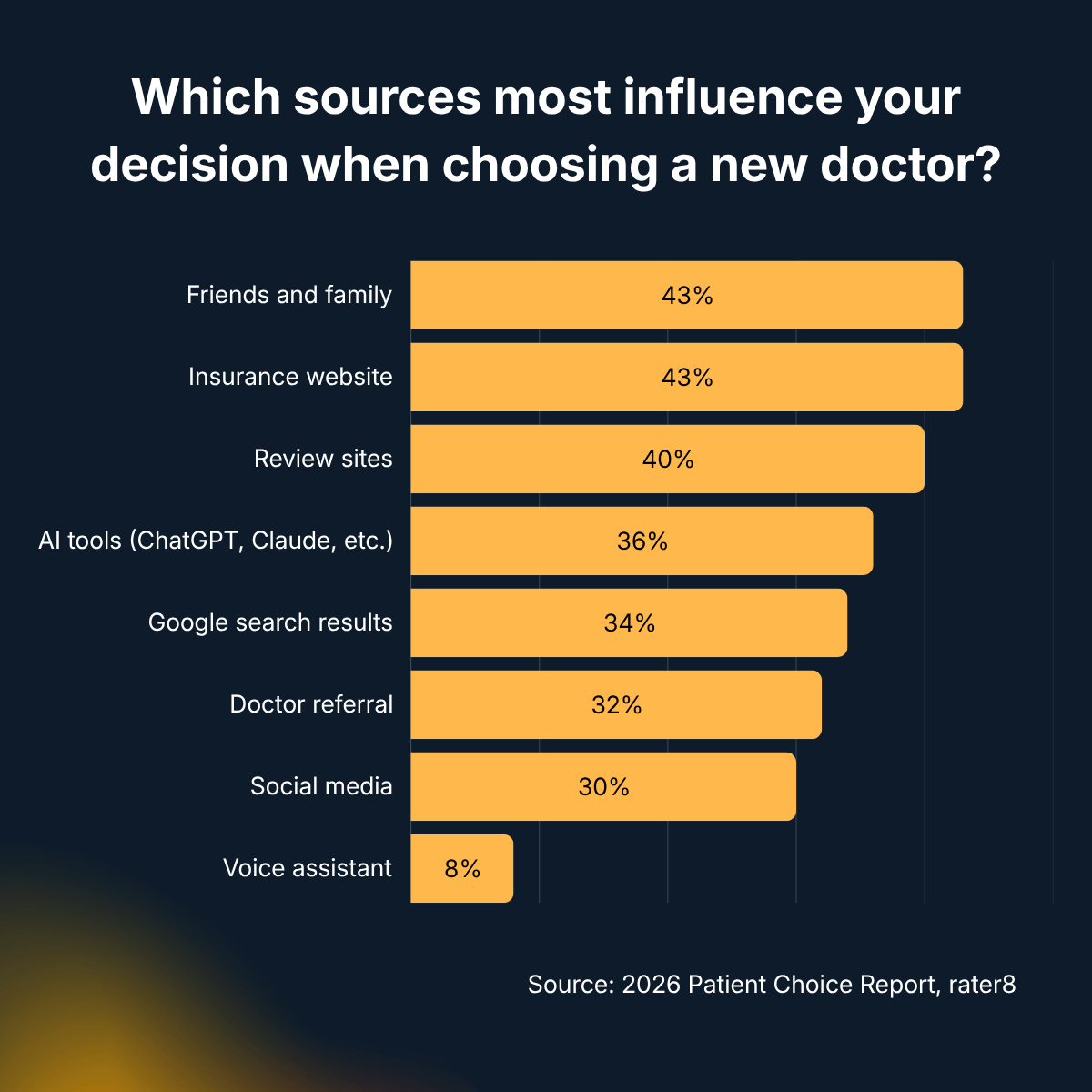
And the most common search patients run is "[specialty] near me," used by 55% of respondents.
The most common search phrase:
"[specialty] near me".
So patients are looking, in large numbers, by service and by location.
The question is whether your website gives Google and AI tools something to match them with?
Why Each of Your Services Needs Its Own Page
Google is fairly direct about how it decides whether a page is relevant to a search.
From its own
explanation of how ranking works:
"The most basic signal that information is relevant is when
content contains the same keywords as your search query. For example, with webpages, if those keywords appear in the headings or body text of a webpage, the information might be more relevant."
Google's SEO Starter Guide makes the same point from the website owner's side:
"Think about the words that a user might search for to find a piece of your content".
Now compare that to how healthcare websites often handle their services...
- There's a Services page with a list: annual physicals, women's health, imaging, lab work.
- Each service might be paired with a short description.
- In the case of 3D mammography, it might be one bullet point under imaging.
When someone searches
"where can I get a 3D mammogram in Jacksonville," Google is looking for a page that is clearly about 3D mammography, in Jacksonville.
A bullet point on a list of twenty services probably won’t get you featured above the clinic across town that has a dedicated page with "3D Mammography" in the heading, a clear explanation of the service, and their location.
"Each new page is a new set of searches your practice can show up for."
AI Tools Need Content About Your Services Too
The same logic applies when a patient asks ChatGPT or Gemini to recommend a healthcare provider.
Information about what you do and where you do it needs to be available online for these tools to read and cite.
In
our own testing of which pages ChatGPT cites when it recommends businesses, service pages and location pages are what it cites most often.
A detailed page about a specific service is one of the strongest things you can give an AI tool to work with.
We cover how to write these pages for AI search in more detail in
How to Optimize Service Pages for Google AI Overviews.
How to Make Your Pages Convert into Patients
Showing up in search may get you a website visitor. What's on the page decides whether the patient calls.
Healthcare searches come with specific questions, and the pages that convert answer them:
- What the service is and who it's for, in plain language a patient can follow
- Who performs it, ideally with provider names and credentials
- Insurance: which plans you accept and, if you’re comfortable stating it, whether the service is typically covered
- Whether a referral is needed for the service
- How to prepare and what to expect on the day
- Which locations offer it, if you have more than one
- How to book, with a phone number that can be tapped on mobile and a clear link to scheduling
Pages that show real providers, real credentials, and medically accurate information are the ones that tend to rank and the ones patients trust.
We go deeper on this in What Businesses in Regulated Industries Need to Know About SEO.
Which Pages to Add First
If you're deciding where to start, look for services that meet one or more of these criteria:
- Patients search for them by name. 3D mammograms, DOT physicals, sleep studies, allergy testing, same-day sick visits, sports physicals. If people are asking your team about specific services, they are probably also searching for them online. Each one should have its own page.
- You have capacity or they're important to your practice. Prioritize services where new patients would make the biggest difference.
- Your competitors have pages for them and you don't. Search for your key services in your area and see who shows up. Any service where a competitor has a dedicated page and you don't is an obvious gap.
How to Tell if the New Pages Are Working
There are several ways to measure the results from adding new pages to your website.
1. Search Console impressions
Google Search Console shows which searches (the keyphrases people type) your pages appear for, when they appear, and how many clicks they receive.
2. Traffic to the page
Your website analytics show how many people visit each page. Look specifically at visits where someone entered your site on that page, since that tells you the page itself brought them in.
3. Click-to-call taps
Many visitors to your healthcare website are on their phones, and most of them call rather than fill out a form.
Tracking taps on your phone number shows how many people went from the page to calling you. If your site is built on Duda, the click-to-call button reports how many clicks it gets.
4. Call tracking numbers
A call tracking service can show a unique phone number on a specific page, so you can count actual calls that came from it.
One caution for healthcare: if the service records or transcribes calls, it will hear patient information, which means the vendor needs to sign a business associate agreement (BAA) with you.
5. Booking button clicks
If your online scheduling runs through your EHR or a third-party platform, you can usually track clicks on the "Book an Appointment" button, though not the completed booking.
Some scheduling platforms can report where their bookings came from, so it's worth asking your vendor.
6. Service volume before and after
Compare new patient bookings for a service in the months before its page went live with the months after.
It's a rough measure, since other factors can play a part, but it's the number that matters most to your practice.
One note on privacy: analytics and tracking on your public website pages are generally fine, but keep tracking tools off your booking pages, patient portal, and anywhere patients enter health information.
We explain more in Does Your Medical Practice Website Need to Be HIPAA Compliant?
The Bottom Line
Adding pages to your website brings in new patients by putting your practice in front of people who are already searching for the services you offer.
Each well-built service page is another search you can show up for, on Google and in AI tools.
A page can't guarantee that a patient will choose you. What it does is make sure you're one of the options they see.
From there, the quality of the page earns the call, and the care your team provides earns the appointment.
Wondering how your website is doing?
We offer a free website audit, no obligation. We will give you an honest read on what is working, what is not, and what is worth addressing.
Request a free website audit →

About the Author: Sara MacQueen
Sara MacQueen is the founder of Bonfire Studio, a boutique web design studio that builds custom websites for established businesses in complex, regulated industries. She has over 20 years of experience spanning design, marketing, and software development.